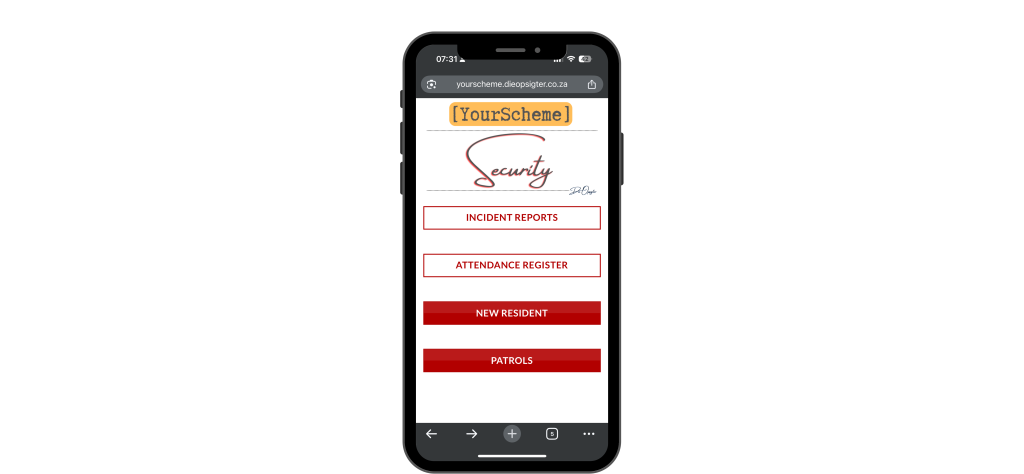
The Security Portal equips your security team with a streamlined digital toolkit for incident logging, attendance tracking, patrol monitoring, and access control — all through an easy-to-use, mobile-friendly dashboard.
Red-Outlined Buttons
(Core Operational Forms)
Incident Reports: Guards capture incidents in real-time, attach photos/videos, and submit detailed accounts. Submissions automatically notify the caretaker and management for review and follow-up.
Attendance Register: Each guard logs shift activity, including shift times, roles, and supervisor feedback. All submissions are stored with timestamps for audit or HR reference.
Solid Red Buttons
(Special Access Forms)
New Resident Form New residents complete this form via a QR code presented by the guard on duty. This ensures that security immediately captures and registers essential information like:
Full name and contact details
Vehicle registrations
Number of occupants
Unit number and lease info
The form instantly updates the residents’ register and notifies the caretaker, ensuring a smooth and secure move-in process. It also sends a welcome pack email to the newly registered resident with a link to the Residents portal and a how-to guide to use the portal.
Patrols Guards scan QR codes placed at patrol checkpoints. Each scan opens a patrol log form for that exact point, auto-capturing:
Time of scan
Notes on area status or concerns
This QR-verified system ensures patrol routes are completed, recorded, and auditable, with no manual tracking required.
Portal Features
QR-based access for New Residents & Patrols
Mobile-optimised for on-the-go use
Real-time email notifications for key submissions
Auto-merging with central records (no admin overhead)